WarmLine → Client calls in a coworking space
Situations · Shared spaces
Taking client calls in a coworking space without sounding like a café

The hum of a shared floor is not your problem. The person two desks away explaining their quarterly numbers is. Here is what your client hears from a coworking desk, and which calls deserve a door.
You can take most client calls from a coworking desk, as long as you separate the steady noise of the room from the voices in it. Fans, coffee machines and the general murmur are the easy part: any decent noise-suppression layer handles them. Nearby conversation is the hard part, because to a filter trained to keep speech, your neighbor sounds like a person worth keeping. So the plan is simple: quick check-ins at the desk with voice-aware suppression on, anything confidential or high-stakes in a booth or a bookable room, and a short listen-back before your first important call from a new spot.
Most writing about coworking calls is aimed at operators who want quieter floors, or at members who want to be polite. This page is about the other end of the line: the client who cannot see your space and judges it entirely by ear.
What your client hears from a coworking desk
A shared floor reaches your microphone in three layers. The bed is constant: ventilation, a fridge, the low wash of many quiet conversations. The events come and go: a laugh, a chair dragged, the milk steamer, someone's phone. The foreground voices are the one or two people close enough that individual words reach your mic.
Your client experiences these very differently. The bed mostly reads as "they're somewhere busy", and a filter removes it so well that the client forgets it was there. Events are brief interruptions that cost you a sentence. Foreground voices are worse than either, because the client's brain tries to follow two conversations at once, and for a few seconds it does not know which voice is you. Listeners call that sounding unprofessional, though what they actually mean is "I had to work to hear you".
Speech is the hard noise, and why
Classic noise suppression works by deciding which parts of the signal are speech and which are not, then keeping the speech. That logic is perfect for a dishwasher and useless for a colleague on a sales call behind you. Both of you are speech. The suppressor has no idea which one is the professional on this particular call.
Vendors have answered with a second kind of feature that keeps only the main voice. Krisp's noise-cancellation page lists it as Voice Isolation, "AI background voice removal technology" that "ensures only active voices on calls are heard, eliminating all other nearby voices and distractions" (read 18 October 2026). The larger meeting platforms document their own voice-profile or high-strength suppression options too, which you will find in your platform's audio settings. We describe no per-app steps here; the point is that a coworking desk needs a feature built for other people's voices, not just a generic noise filter.
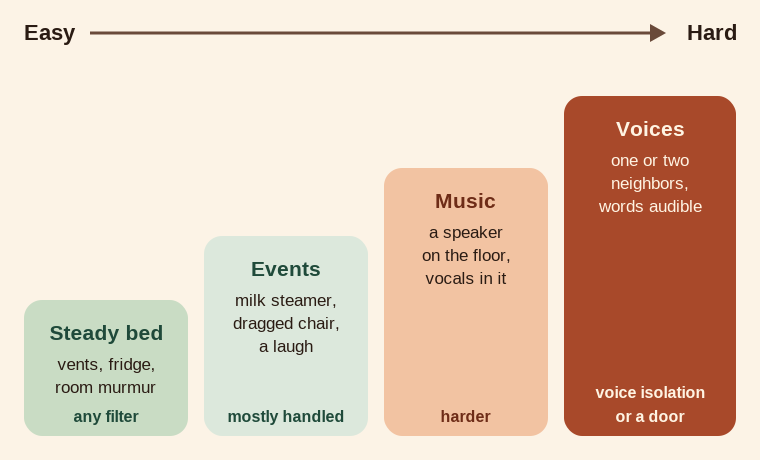
Our reading of how speech-keeping suppression behaves, not a lab test. Try your own worst seat before relying on any of it.
Distance still matters more than any setting. The closer your mouth is to the microphone you use, the louder you are relative to everyone else, and the less work any filter has to do. That is not a hardware recommendation; it is a reason to sit up and not lean back in your chair when the client starts talking about scope.
Booth, meeting room or desk: by call type
Not every call needs the booth, and the booth is often booked. Decide by what is said on the call and how much is at stake, not by habit.
| Call type | Where | Why |
|---|---|---|
| Five-minute check-in with a client you know | Desk | Low stakes; voice-aware suppression covers the floor |
| First call with a new prospect | Booth if free | First impressions are made in the opening seconds; reduce variables |
| Discovery or scoping, 30 minutes or more | Booth or room | Long open-mic time under the client's story; neighbors change mid-call |
| Pricing, negotiation, anything about named people | Never the desk | Your side is overheard; the problem is privacy, not audio |
| Demo with screen share | Room | You will speak at length and your laptop works hard; give both space |
Notice the fourth row. Suppression can stop your client hearing the floor; nothing on your laptop stops the floor hearing you. If the call involves pricing, personnel or a client's internal politics, the desk is the wrong seat however good your audio sounds.
Software settings for neighbor voices
Treat this as a once-per-space setup, not a per-call ritual.
- One suppression layer, not two. If you use a dedicated layer, turn the meeting platform's own suppression down so the two do not fight. Stacked filters are the most common route to a robotic voice.
- Use the voice-isolation mode, not just noise removal. On a shared floor, the feature that removes other voices is the one doing the work.
- Check the other direction. Krisp's page describes options for cancelling your own noise and cancelling noise from other participants. On a busy floor the outgoing side is the priority.
- Record ten seconds at your actual desk, with the floor at its normal level, and play it back on phone speakers. Our pre-call checklist has the routine. If you can follow a neighbor's words on the playback, so can your client.
- Watch your first word. Aggressive isolation can trim the start of a sentence after you have been silent. Start with a soft lead-in ("So,") on the first sentence of a call until you know how your setup behaves.
Etiquette that protects your call and theirs
Coworking rules vary by space, and most are written to protect the people around you. They protect your calls too. Face the wall or window rather than the room, so your voice goes away from neighbors and their voices reach the back of your microphone less. Keep your own level steady instead of raising it to compete; a filter handles a calm voice in a noisy room better than a strained one. And when a neighbor's call starts, move before they get loud, not after your client asks who is talking.
If you hold a recurring call with the same client, book the room for that slot every week. Consistency is part of sounding professional, and sounding the same each time is easier from the same room.

Line check
A coworking desk is where a voice-aware layer earns its keep. Krisp's desktop app runs that isolation on Windows and macOS. Krisp lets you test it for seven days without handing over a card. Keeping Core after that is $8 monthly for each person if you sign up for the year, $16 if you pay as you go, as listed on krisp.ai on 2026-10-18. The trial is the only free part.
Quiet the floor behind you with Krisp
Booth free and floor quiet today? Your platform's own suppression plus the booth costs nothing.
Coworking call questions
Can I take client calls in a coworking space?
Yes, for most calls. Use a suppression feature that removes nearby voices, keep confidential and high-stakes calls for a booth or room, and test your seat with a short recording first.
Why does my client still hear people talking behind me?
Ordinary noise suppression keeps speech, and your neighbors are speech. You need a voice-isolation feature that keeps only the main voice, or more distance between you and them.
Is a phone booth always better?
For privacy, yes. For sound, usually, though small booths can sound boxy. Run the same ten-second playback in the booth before you trust it with a first call.
Should I use the platform's noise suppression or a separate app?
Either, but not both at full strength. A separate layer helps most when you move between spaces and meeting platforms; the built-in option is enough if you mostly book the booth.
What should I do if a loud neighbor starts mid-call?
Say one calm line ("Give me ten seconds, I'm moving somewhere quieter"), mute, move, and pick up exactly where you left off. The mid-call noise playbook has more lines.
The fit question for a dedicated layer, coworking floors included, is on Krisp for client calls. The full setup behind every call is in how to sound professional on client calls.