WarmLine → Professional voicemail greeting
Situations · When you miss the call
How to record a professional voicemail greeting that sounds right

Your greeting is the only version of your voice a client hears when you are not there. Most guides hand you a script. This one is about how the recording sounds.
To record a professional voicemail greeting, write four short lines, record them in the quietest room you have at your normal call volume, and then phone your own number from a different phone and listen like a client would. The script is the easy part; plenty of good examples exist. What gives a greeting away is the sound: a hollow room, a television in the background, a voice that is louder or flatter than the one the client met on the last call. Fix those and a plain script sounds more professional than a clever one.
Why the greeting is a first impression
The people who reach your voicemail are rarely strangers. They are the prospect returning your call, the candidate with a question about the offer, the client whose deadline moved. They already have an impression of your voice, and the greeting either matches it or quietly undercuts it. A greeting recorded on a busy afternoon in a kitchen tells them something about how you work, whether or not that is fair.
It is also the one piece of your audio you can perfect. A live call happens once; a greeting plays hundreds of times. That makes ten minutes of care unusually good value.
A four-line script
Keep it to four lines and well under half a minute. Callers listening to a long greeting are waiting for the beep, not for you.
Everyday: "Hi, you've reached [your name] at [company]. I can't pick up right now. Leave your name, number and what it's about, and I'll call you back today."
Out of office: "Hi, it's [your name] at [company]. I'm away until [day and date]. For anything urgent, email the office address on my signature; otherwise leave a message and I'll call you when I'm back."
Notice what is missing: no apology, no "your call is important", no list of hours. Name and company first, so the caller knows they dialled the right person; one clear instruction; one honest promise about when you will call. Only promise "today" if you will keep it.
Where and how to record it
Treat the greeting like a short voice-over, not a phone call. The difference is that you can choose the moment.
- Pick the deadest room you have. Soft furnishings beat bare walls. A bedroom with the curtains closed usually sounds better than a home office with a hard floor, and a parked car on a quiet street often beats both.
- Choose quiet time. Record when the household, the street and the building are at their calmest. Turn off fans and anything that hums.
- Speak at your call level. Callers will hear the greeting right after hearing you on calls. A greeting that is louder, slower or more formal than your real voice sounds like someone else.
- Smile on the first word. It is an old radio trick and it works: warmth survives the phone line better than enthusiasm does.
- Leave a short pause before you speak and after your last word, so nothing gets clipped when the recording starts and stops. Then listen to the start and end specifically.
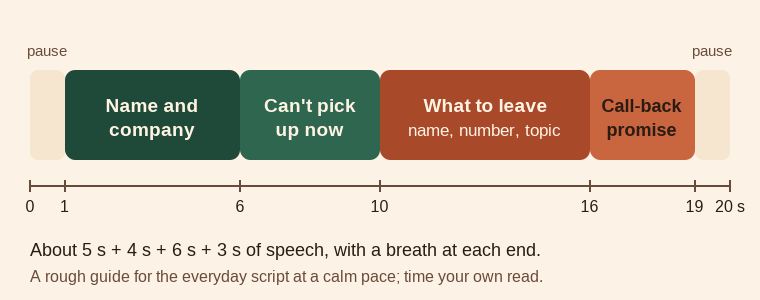
Timings are our rough guide for the everyday script read at a calm pace, not a rule. Time your own read.
How your recording route changes the sound
Business phone systems usually offer one or more ways to set a greeting. Each one runs your voice through different processing, which is why the same script can sound different by route.
| Recording route | What shapes your voice | What to check |
|---|---|---|
| Dial in and record from the handset menu | The phone's microphone and the phone line itself | Room noise and distance from the phone |
| Record inside your phone system's desktop or web app | Your computer microphone and any suppression layer you run | That the right microphone is selected, and only one filter is on |
| Upload an audio file, if your system allows it | Whatever you recorded with, then the system's conversion | The file format your system accepts; the callback test afterwards |
If you record through your computer, run the same noise suppression you use on client calls. The greeting will then match your live voice, which is the whole point. If you record through the handset, no laptop software is involved, so the room has to be quiet on its own.
The callback test
Never judge a greeting by the playback button. Call your own number from a different phone, let it ring through, and listen twice: once with the phone at your ear and once on speaker, the way a busy person checks voicemail. Listen for three things: whether the first syllable of your name survived, whether anything in the background competes with you, and whether you sound like the person on your last client call. If any answer is no, record again. It takes two minutes, and the first-impression checklist uses the same habit for live calls.
Re-record whenever something in the script goes stale: a new role, a new company name, a holiday that has ended. An out-of-office greeting still playing a week after you are back undoes the care you put into the first one.

Line check
Recording through your computer in a room that is never fully quiet? A suppression layer makes the greeting match your call voice. Krisp's desktop app is one. You get a week to try it before any payment details are asked for; staying costs $8 a head each month on a one-year commitment, or $16 without it (krisp.ai, 2026-10-18). After that week, keeping it means paying for it.
Record a cleaner greeting with Krisp
A closet full of coats and a quiet ten minutes will also do the job, for nothing.
Voicemail greeting questions
How long should a professional voicemail greeting be?
Short enough that callers are not waiting for the beep. Four lines read at a calm pace usually land around twenty seconds.
What should a professional voicemail greeting say?
Your name and company, that you can't pick up, what the caller should leave, and when you will call back. Skip apologies and filler.
Why does my greeting sound worse than my calls?
Usually the room or the route. Recording on the handset bypasses any suppression on your computer, and a quiet-sounding room can still echo. Record somewhere softer, or through the same setup you call from.
Should I use background music or a professional voice actor?
For an individual professional, your own voice is the point: callers are trying to reach you. Music under speech also gives the phone line more to squash.
How do I check how my greeting really sounds?
Call your number from another phone and listen at the ear and on speaker. That is how clients hear it, and it is the only test that counts.
Missed calls lead to callbacks, and callbacks are where consistency shows: see follow-up call habits. Recruiters returning candidate calls will find their own notes on recruiter call audio.